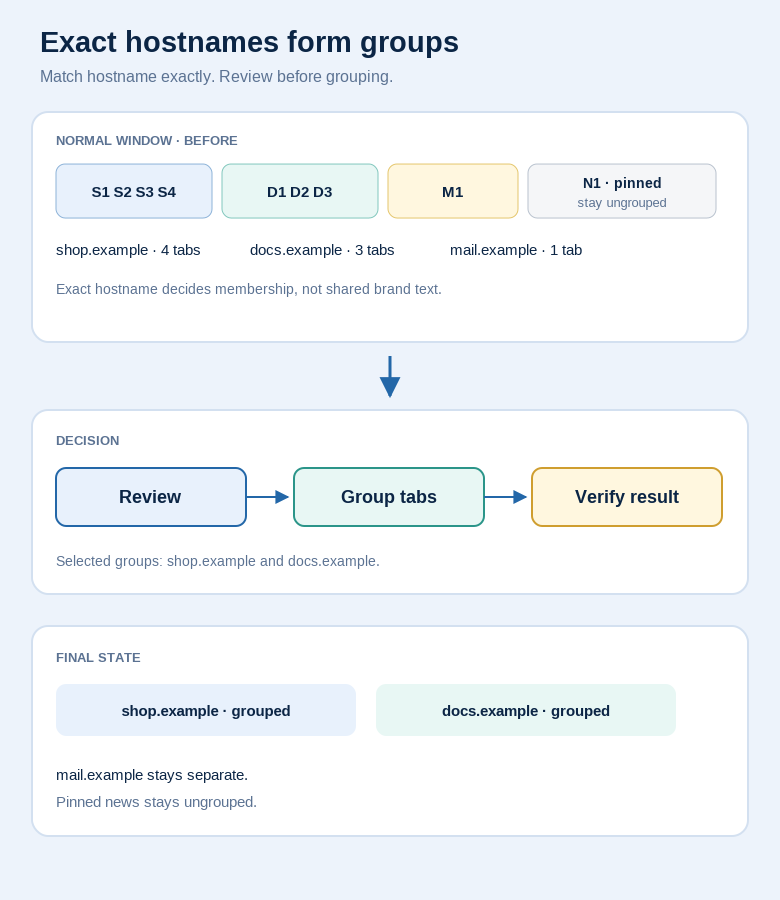
Preview proposed exact-host groups and verify which tabs stay ungrouped before applying changes.
Parse the URL before grouping
Read each open URL in two parts: hostname and path. The hostname identifies the site boundary; the path only identifies a page within that host.
For example:
https://shop.example.com/products/17→ hostnameshop.example.com, path/products/17https://shop.example.com/cart→ hostnameshop.example.com, path/carthttps://docs.example.com/start→ hostnamedocs.example.com, path/starthttps://news.example.net/story→ hostnamenews.example.net, path/story
The first two pages have different paths but the same hostname, so they are candidates for one group. The documentation page has a different hostname and should not join that group by default. The news page belongs to neither set.
Paths should not create separate groups unless your task specifically requires it. A product page, checkout page, and account page can still be one shop.example.com group because they are pages on the same host.
Exact host is not the same as shared domain
Subdomains often look like one organization, but they may serve different functions and have different navigation, login state, or work context. Grouping shop.example.com and docs.example.com merely because both end in example.com broadens the rule from exact host to parent domain.
Use this decision order:
- Compare complete hostnames, including subdomain labels.
- Put tabs with identical hostnames in one candidate group.
- Keep different subdomains separate unless you intentionally define a parent-domain rule.
- Leave unrelated hostnames outside the set.
- Check exceptions such as pinned tabs and existing groups before applying changes.
Do not use a brand name in the page title as the grouping key. Two pages can display the same brand while having different hostnames. Conversely, a single hostname can contain several unrelated-looking sections that still belong to one exact-host group.
Worked example: one Firefox window
Suppose one ordinary window contains this illustrative tab set:
Test how single-tab sites and pinned exceptions appear in the grouping preview for each window.
shop.example.com/products/17shop.example.com/ordersdocs.example.com/apinews.example.net/story- a pinned tab, regardless of its URL
The two shop.example.com tabs are included together. Their paths differ, but their hostnames match exactly. The docs.example.com tab is excluded from that group because docs is a separate subdomain. The news tab is excluded because its hostname is unrelated.
The pinned tab remains separate even if its hostname matches shop.example.com. Pinning is an exception to ordinary tab membership, not evidence that its URL belongs to another site. The expected result is one proposed exact-host group containing the two shop tabs, while the documentation tab, news tab, and pinned tab remain unchanged.
Decide what happens to one-tab sites
A site with only one eligible tab does not need a group. In this example, docs.example.com has one tab, so leaving it ungrouped keeps the tab bar from gaining a group that contains no additional related pages. The news tab should also remain ungrouped because it is a one-off page outside the requested host.
If your grouping interface offers a choice for single-tab sites, exclude them for this task. Review the proposed membership first rather than assuming every hostname must become a group.
Apply the rule per normal window
Repeat classification independently in each selected normal window. Two tabs on shop.example.com in different windows may have the same hostname, but they should not be moved across windows to create one cross-window group. Each window keeps its own exact-host group.
Private windows may be unavailable to grouping features, and pinned tabs generally remain outside ordinary grouping. Existing groups may also be left unchanged unless you explicitly choose to add eligible tabs. Check current Firefox behavior and any extension’s compatibility before relying on a particular control.
Verify before changing tabs
Before confirming, inspect the proposed group name and its tab list. Ask three questions: do all listed tabs have the same full hostname, did any different subdomain enter by mistake, and are pinned or already-grouped tabs marked to stay out?
If the answer is yes, the classification matches “group tabs by domain firefox” without silently changing the meaning of domain. Apply the grouping only after that review; leave broader parent-domain grouping for a separate, deliberate decision.
How To Group Open Tabs On Firefox
Review proposed group names, colors, and ungrouped exceptions before confirming live tab changes.